調べ物やAIの回答に git checkout と git switch が混ざって出てきて、どちらを打てばいいのか分からない人向けの話です。ブランチ(枝)は、本筋を止めずに作業を分ける線のことです。サンプル料理教室のホームページを例に、対応する2つの書き方を実際に動かして並べます。あわせて、古いコミットを見に行ったときに出る detached HEAD という長い英語の意味と、そこから戻る方法も確かめます。読み終わると、古い記事のコマンドを読み替えられて、detached HEADが出ても慌てずに済みます。
この記事の内容
先に答えると
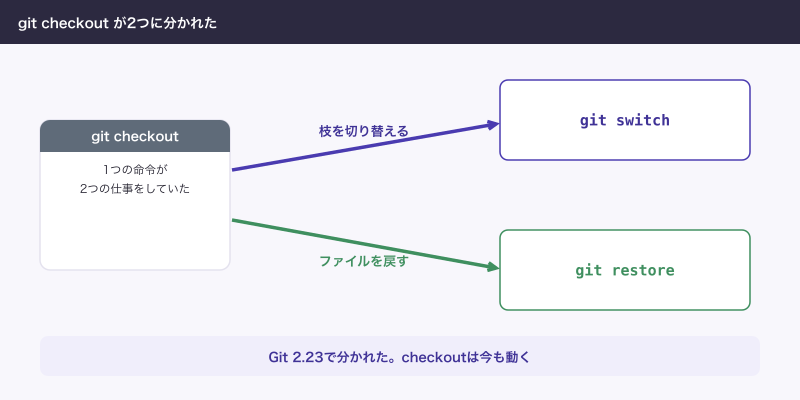
枝の切り替えは git switch、ファイルを戻すのは git restore を使います。git checkout はこの2つの役を1つで持っていた古い入口で、今も動きます。自分で打つなら新しいほうが誤解がありません。
git checkout -b 枝はgit switch -c 枝と同じですgit checkout -- ファイルはgit restore ファイルと同じで、コミットしていない変更が消えますgit switchはGit 2.23で追加されました。それより古いGitにはありません- 移れないときの選択肢は、コミット、
git stash、--discard-changesの3つです。最後のものは変更が消えます - detached HEADは枝の外にいる状態で、
git switch -で戻り、git switch -c 枝で作業を救えます
対応の表
| やること | 新しい書き方 | 古い書き方 |
|---|---|---|
| 枝を移る | git switch main | git checkout main |
| 枝を作って移る | git switch -c fix-menu-price | git checkout -b fix-menu-price |
| 指定の場所から枝を作る | git switch -c 枝 main~1 | git checkout -b 枝 main~1 |
| 直前の枝に戻る | git switch - | git checkout - |
| 変更を捨てて移る | git switch --discard-changes 枝 | git checkout -f 枝 |
| 古いコミットを見に行く | git switch --detach コミット | git checkout コミット |
| ファイルの変更を捨てる | git restore menu.html | git checkout -- menu.html |
| ファイルを昔の版にする | git restore --source コミット menu.html | git checkout コミット -- menu.html |
main~1 は main の1つ前のコミットです。コミットは、変更を1回分の記録として残したものです。ここからの表示は、一時フォルダに作った練習用のリポジトリで動かしたものです。
$ git --version
git version 2.50.1 (Apple Git-155)

$ git switch -c fix-menu-price
Switched to a new branch 'fix-menu-price'

$ git switch main
Switched to branch 'main'
Your branch is up to date with 'origin/main'.

$ git checkout -b add-summer-class
Switched to a new branch 'add-summer-class'

$ git checkout main
Switched to branch 'main'
Your branch is up to date with 'origin/main'.

$ git switch -
Switched to branch 'add-summer-class'
(最後の行は、直前にいた枝の名前が出ます。)
同じ結果になるので、古い記事の手順はこの表で読み替えれば動きます。違いが出るのは次の3点です。
| 違い | git switch・git restore | git checkout |
|---|---|---|
| 枝の名前を間違えた | fatal: invalid reference | error: pathspec ... did not match |
| コミットの番号を渡した | --detach がないと止まる | そのまま枝の外に出る |
| 昔の版のファイルを取り出した | 作業中のファイルだけ変わる | git add 済みの状態にもなる |
最後の行は、git status --short の印の位置で分かります。左に寄った M が git add 済みです。
$ git restore --source e8d23cd~1 menu.html

$ git status --short
 M menu.html

$ git checkout e8d23cd~1 -- menu.html

$ git status --short
M  menu.html
もともと git checkout が1つで2つの仕事をしていたので、分けられました。公式の説明でも、git checkout には枝を切り替える役と、別の版のファイルに戻す役の2つがあるとされています。Git 2.23のリリースノートに、この2つを git switch と git restore に分けて導入したとあります。
古いGitでは git switch を打ってもコマンドが無いというエラーになります。git --version で2.23より古いと出たら、Gitを更新するか、表の右の列を使います。
切り替えられないとき
menu.html を編集中で、移り先の枝でも同じファイルの内容が違っていると、止まります。
$ git status --short
 M menu.html

$ git switch fix-menu-price
error: Your local changes to the following files would be overwritten by checkout:
	menu.html
Please commit your changes or stash them before you switch branches.
Aborting
変更はまだ消えていません。Gitが上書きを止めてくれた状態です。選択肢は3つです。
| 選択肢 | 変更はどうなるか | 向いている場面 |
|---|---|---|
| コミットする | 枝に残る | 区切りがついている、残したい |
git stash | 一時的によけて、あとで戻せる | 書きかけで、割り込みを先に片づけたい |
--discard-changes | 消える。戻せない | 捨てると決めている |
コミットする
今いる枝に入れたくないなら、枝を作ってからコミットします。
$ git switch -c save-work
Switched to a new branch 'save-work'

$ git commit -m "作業の途中"
[save-work 750b86b] 作業の途中
 1 file changed, 1 insertion(+), 1 deletion(-)

$ git switch main
Switched to branch 'main'
Your branch is up to date with 'origin/main'.

$ git switch fix-menu-price
Switched to branch 'fix-menu-price'
git stashでよける
git stash は、書きかけの変更を一時的によける操作です。戻す先の枝で git stash pop を打ちます。
$ git stash
Saved working directory and index state WIP on main: 363c383 問い合わせの電話番号を修正

$ git switch fix-menu-price
Switched to branch 'fix-menu-price'

$ git switch main
Switched to branch 'main'
Your branch is up to date with 'origin/main'.

$ git stash pop
On branch main
Your branch is up to date with 'origin/main'.

Changes not staged for commit:
  (use "git add <file>..." to update what will be committed)
  (use "git restore <file>..." to discard changes in working directory)
	modified:   menu.html

no changes added to commit (use "git add" and/or "git commit -a")
Dropped refs/stash@{0} (64f54133f74b556d180ccfa0bd059042cee1a200)
–discard-changesで捨てる
変更を捨てて移ります。確認は出ません。コミットしていないので、Gitからは取り戻せません。先に git diff で中身を見てから打ちます。
$ git switch --discard-changes fix-menu-price
Switched to branch 'fix-menu-price'

$ git status --short

$ grep -n 和食 menu.html
2:<p>和食の基本 6,300円</p>
ぶつからないときは持ったまま移れる
移り先の枝と内容がぶつからなければ、Gitは止めず、編集を持ったまま移ります。ファイルの横に M が出ているときがこれです。
$ git switch add-summer-class
Switched to branch 'add-summer-class'
M	index.html
書きかけが別の枝に入ってしまう原因になるので、移ったら git status を見ます。
git checkout — ファイルの危なさ
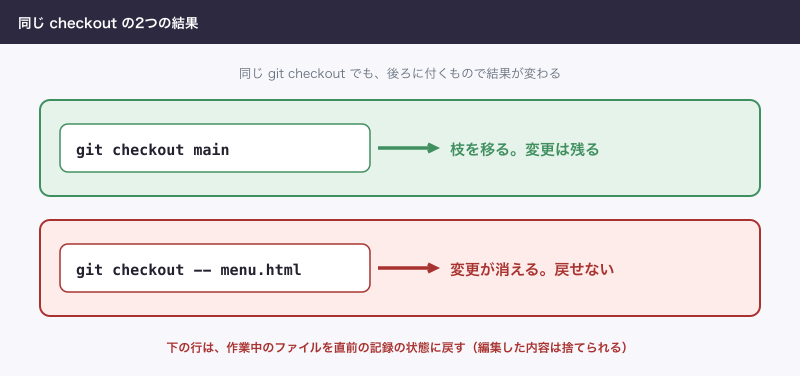
git checkout -- menu.html は枝を移る操作に見えますが、コミットしていない変更を捨てる操作です。確認は出ず、何も表示されません。
$ git diff --stat
 menu.html | 2 +-
 1 file changed, 1 insertion(+), 1 deletion(-)

$ git checkout -- menu.html

$ git diff --stat

$ grep -n 和食 menu.html
2:<p>和食の基本 6,200円</p>編集した9,999円が消えました。git restore menu.html も同じ結果になります。役割の名前から読み取れる分だけ、restore のほうが打ち間違いに気づけます。
-- はファイル名の始まりの印です。枝とファイルが同じ名前のとき、これがないとGitは枝だと判断します。次の例は fix-note という枝とファイルが両方ある場面です。
$ git checkout fix-note
Switched to branch 'fix-note'
M	fix-note
変更を捨てるつもりで打つと、枝が移ってしまいます。ファイルの話なら git restore にしておけば、この心配がありません。
detached HEADとは
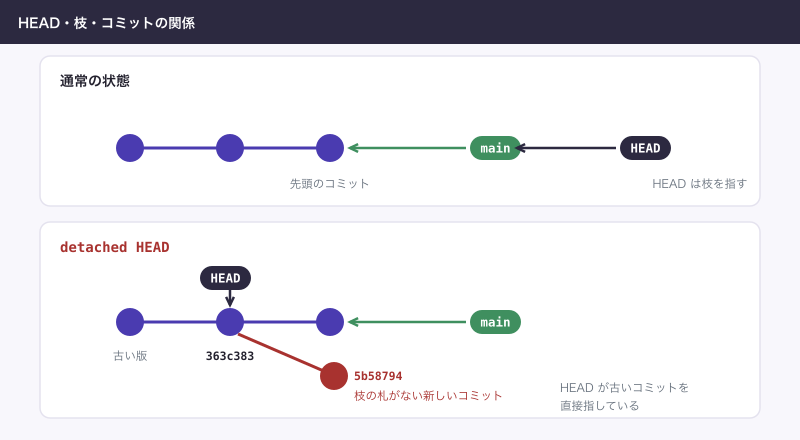
HEAD は「今いる場所」の札です。ふつうは枝を指し、枝が先頭のコミットを指しています。古いコミットを直接開くと、HEAD が枝を通さずコミットを指します。この状態がdetached HEAD(枝から外れた状態)です。壊れたわけではありません。
git switch は、コミットの番号を渡すと止めてくれます。
$ git log --oneline -4
f9d5133 メモを消す
d6850bf メモを追加
363c383 問い合わせの電話番号を修正
e8d23cd 料金表を修正

$ git switch HEAD~2
fatal: a branch is expected, got commit 'HEAD~2'
hint: If you want to detach HEAD at the commit, try again with the --detach option.

$ git switch --detach HEAD~2
HEAD is now at 363c383 問い合わせの電話番号を修正

$ git status
HEAD detached at 363c383
nothing to commit, working tree clean
git checkout は止めません。代わりに次の全文が出ます。
$ git checkout 363c383
Note: switching to '363c383'.

You are in 'detached HEAD' state. You can look around, make experimental
changes and commit them, and you can discard any commits you make in this
state without impacting any branches by switching back to a branch.

If you want to create a new branch to retain commits you create, you may
do so (now or later) by using -c with the switch command. Example:

  git switch -c <new-branch-name>

Or undo this operation with:

  git switch -

Turn off this advice by setting config variable advice.detachedHead to false

HEAD is now at 363c383 問い合わせの電話番号を修正
日本語にすると、見て回っても試してもよく、枝に戻れば影響は残らない、残したければ git switch -c、やめるなら git switch -、という案内です。
見るだけなら戻るだけ
古い料金を確かめて、元の枝に戻ります。
$ grep -n 和食 menu.html
2:<p>和食の基本 6,200円</p>

$ git switch -
Previous HEAD position was 363c383 問い合わせの電話番号を修正
Switched to branch 'main'
Your branch is up to date with 'origin/main'.
そこでコミットするとどうなるか
コミットはできます。ただし枝に属さないので、離れると一覧から見えなくなります。
$ git commit -m "古い版に案内を追加"
[detached HEAD 5b58794] 古い版に案内を追加
 1 file changed, 1 insertion(+)

$ git status -sb
## HEAD (no branch)

$ git switch main
Warning: you are leaving 1 commit behind, not connected to
any of your branches:

  5b58794 古い版に案内を追加

If you want to keep it by creating a new branch, this may be a good time
to do so with:

 git branch <new-branch-name> 5b58794

Switched to branch 'main'
Your branch is up to date with 'origin/main'.

$ git log --oneline --all --grep=古い版
最後の検索で何も出ません。全部の枝を探しても、もう見つからないという意味です。参照のないコミットはいずれGitの掃除で消されるので、早めに救います。
git switch -cで救う
まだその場にいるなら、git switch -c で枝を作るだけです。
$ git switch -c try-note
Switched to a new branch 'try-note'離れたあとなら、git reflog(手元で動いた記録)で番号を探して枝を作ります。Warningの中の番号が分かっていれば、それを使います。
$ git reflog -2
f9d5133 HEAD@{0}: checkout: moving from 5b587947d202aecacac544a27ffcf8ab45cc94f7 to main
5b58794 HEAD@{1}: commit: 古い版に案内を追加

$ git switch -c rescue-old-note 5b58794
Switched to a new branch 'rescue-old-note'

$ git log --oneline -2
5b58794 古い版に案内を追加
363c383 問い合わせの電話番号を修正
リモートの枝に切り替える
外注エンジニアBが add-summer-class を送ったという連絡が来た場面です。リモート(GitHubのような共有の置き場)の枝は、手元に受け取るまで見えません。
$ git switch add-summer-class
fatal: invalid reference: add-summer-class

$ git fetch
From ../remote/website
 * [new branch]      add-summer-class -> origin/add-summer-class

$ git branch -a
  fix-menu-price
* main
  remotes/origin/HEAD -> origin/main
  remotes/origin/add-summer-class
  remotes/origin/main

$ git switch add-summer-class
Switched to a new branch 'add-summer-class'
branch 'add-summer-class' set up to track 'origin/add-summer-class'.

$ git status -sb
## add-summer-class...origin/add-summer-class
git fetch は送り先の更新を受け取るだけの操作です。手元に同じ名前の枝がなく、リモートに1つだけあると、git switch が同じ名前の枝を作って、リモートの枝と結びつけます。結びつけた枝を追跡枝と呼びます。以後は git pull と git push が枝の名前なしで動きます。git checkout add-summer-class でも同じです。
$ git checkout add-summer-class
Switched to a new branch 'add-summer-class'
branch 'add-summer-class' set up to track 'origin/add-summer-class'.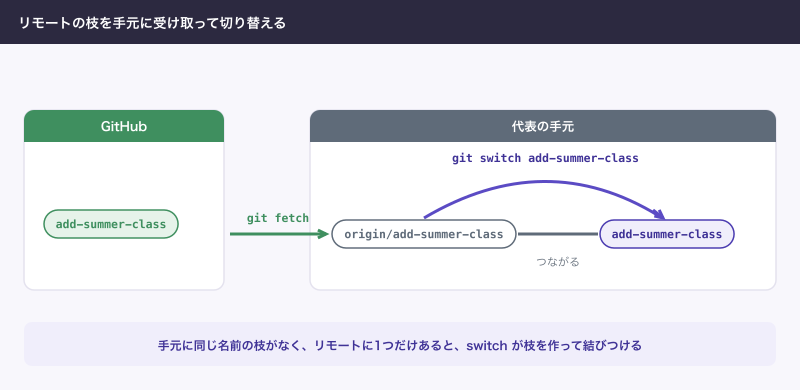
できないことと、その代わり
| できないこと | その代わり |
|---|---|
| 1つのフォルダで2つの枝を同時に開く | もう1つ別のフォルダにcloneする |
git switch でファイルを戻す | git restore を使う |
--discard-changes で捨てた変更を戻す | 戻せない。迷うなら git stash |
コミットの番号を git switch だけで開く | --detach を付ける |
2.23より古いGitで git switch を使う | Gitを更新する。できないなら git checkout |
よく詰まるところ
| 症状 | 原因 | 直し方 |
|---|---|---|
fatal: invalid reference: 枝 | 打ち間違い、またはまだ受け取っていない | git fetch のあと git branch -a で名前を確かめる |
error: pathspec '枝' did not match any file(s) known to git | git checkout での同じ間違い | 同じ |
fatal: a branch named '枝' already exists | -c でもう一度作ろうとした | -c を外して git switch 枝 |
fatal: a branch is expected, got commit | git switch にコミットの番号を渡した | 見るだけなら --detach を付ける |
HEAD detached at と出る | 古いコミットを開いている | git switch - か git switch main。残すなら先に git switch -c 枝 |
would be overwritten by checkout | 変更が移り先とぶつかる | コミットか git stash。捨てるなら git diff を見てから --discard-changes |
| 別の枝で変更が消えたように見える | 移ったのでその枝の状態になった | 元の枝に戻る。枝を移っても、コミットは消えない |
AIが git checkout を提案してきたら、この記事の表で読み替えて意味を確かめます。-- か -f が付いていれば、変更が消える操作です。実際に運用していると、AIが古いコミットを git checkout で開いたまま作業を続け、枝に入っていないコミットが積み上がることがあります。作業の前に git status で枝の名前を見させます。
次に読む
枝を分けて合流する流れは「git branchとmergeの使い方:枝を分けて合流する、GitHub Flowまで」、変更やコミットを取り消すときは「Gitで元に戻す:revert・reset・restoreの違いと使い分け」にあります。リモートの枝を受け取る話は「git clone・pull・fetchの違い:受け取る操作の使い分け」、ほかのコマンドを引くなら「Gitコマンド一覧:場面ごとによく使うものと、危ないもの」を開きます。